




What is JBOD?
JBOD (just a bunch of disks) is a cost-effective storage solution that adds high-density data storage by connecting multiple hard drives in a single chassis enclosure.
Servers Direct · May 1, 2020
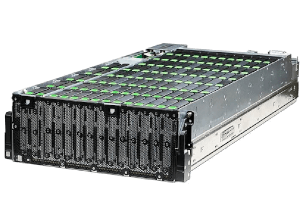
As data centers continue to grow, companies are looking for an option that lets them store the most data in the least amount of space — all at the lowest price. For many use cases, such as data archiving and video surveillance storage, JBOD is the simplest and most effective solution.
What is JBOD?
JBOD is an acronym for "just a bunch of disks" or "just a bunch of drives."
Sometimes referred to as an expansion unit, JBOD is a simple, cost-effective way to add high-density data storage to a system by connecting multiple hard drives and housing them within a single chassis enclosure. It is an easy-to-manage, extremely reliable storage solution for companies with growing data centers.
Think of JBOD as a bank vault for your data — the safest and most efficient way to have on-premises storage. Since the JBOD chassis is designed for drives only, it's not competing for power or airflow with other hardware like motherboards and CPU.
A JBOD enclosure can be configured in JBOD or passthrough mode to support software file systems like ZFS and Storage Spaces. JBOD can also connect to controllers from popular manufacturers like LSI and Microsemi for hardware RAID management.
What are the benefits of JBOD?
In addition to being cost-effective and highly reliable, JBOD provides a host of other benefits, including:
- Minimal footprint with maximum storage space
- Integration with new or existing servers
- High performance with hardware RAID 50 or 60
- Compatibility with Linux software RAID file systems like ZFS, Gluster, and BTRFS
- Easy access to hot-swappable drive bays
- Independent scaling of storage and compute
- High availability support
- Expanded storage for Windows, Linux, and VMware servers
How can you use JBOD?
JBOD is a great solution for any enterprise that needs local storage expansion without the high cost of adding multiple servers. JBOD can add anywhere from hundreds of TB to multiple PBs of data storage.
A few examples of data storage scenarios that JBOD works well for include:
- Data backup and archiving
- Security and surveillance
- Media storage
- Replacing tape drives
- High availability and data protection
When should you use JBOD alternatives?
JBOD has high capacity, so it works well when large amounts of offline data need to be stored. But the tradeoff is low performance, which means JBOD is not necessarily a good option for primary storage. If your capacity needs aren't huge and you need high performance, another solution would be better — see our all-flash NVMe options for primary storage tiers.
Conclusion
The right storage partner will ask about the amount of space, level of performance, and redundancy you need. Based on your answers, they'll recommend the appropriate quantity of drives, type of JBOD, and the best software to manage it.
Whether you need to expand your current server capacity or are looking to implement an all-new solution, it is important that you carefully select the right solution. A partner like Servers Direct can help you get the right JBOD configuration for your needs and budget.
When you get in touch with us, we'll ask about the amount of space, level of performance, and redundancy you need. Based on your answers, we'll recommend the appropriate quantity of drives, type of JBOD, and the best software to manage it. See our JBOD enclosures and the full Storage lineup to start, or talk to a sales engineer.
Spec a system based on this guide.
Tell us what you took from this article — we’ll come back with a configuration.
Need rack-scale or integrated infrastructure?
For multi-node clusters, integrated racks, and larger enterprise deployments, our parent company Equus Compute Solutions handles the build. Same engineering team and supply chain, scaled up.